There was a problem loading the comments.

How to optimize the database via phpMyAdmin in cPanel?

Support Portal  »  Knowledgebase  »  Viewing Article

  Print
1. Log into your cPanel account.

2. In the Databases section, click on the phpMyAdmin icon.
phpmyadmin-icon.gif


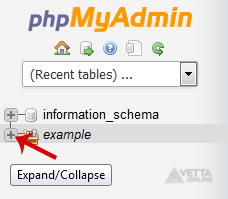
3. In left side-bar, Click on the expand button to expand the database like "example".
phpmyadmin-expand-db.gif


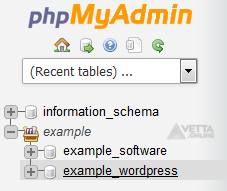
4. Under your cPanel username, you can see a list of all databases. Select the appropriate database which you want to optimize.
phpmyadmin-db-list.gif
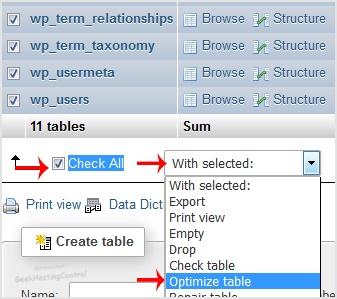
5. Scroll down and mark Check All then click on the Drop-down option and select Optimize tables.

optimize-db.gif

Table successfully optimized.

Share via
Did you find this article useful?  

Related Articles

© Vetta Group