Back to website
Login
Home
Login
Register
Back to website
There was a problem loading the comments.
How to remove multiple posts with a single click in WordPress?
Support Portal
»
Knowledgebase
» Viewing Article
Print
20/06/2019 7:14 PM
WordPress
It is possible to remove multiple posts in your WordPress dashboard. You can also delete selected posts with just a few clicks.
1.
Login to your WordPress admin dashboard.
2.
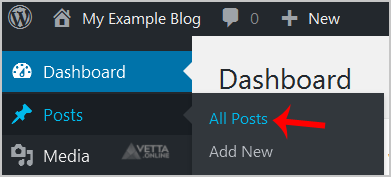
Under the dashboard menu, hover your mouse over
Posts
and click on
All Posts
.
3.
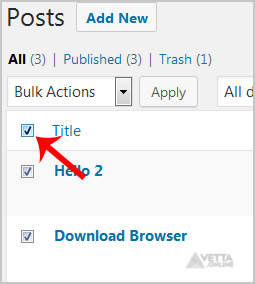
Tickmark the top checkbox, and all checkboxes will be automatically selected.
4.
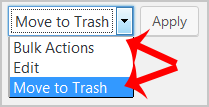
Now click on
Bulk Actions
and select
Move to Trash
from the drop-down menu. Then click on
Apply
.
It's done. Your post is removed and no longer available for public view.
Share via
Did you find this article useful?
Related Articles
How to delete your database in DirectAdmin?
How to create an E-mail Autoresponder when you are unavailable or on vacation?
How to download files and folders to your computer using FileZilla?
Categories
4
Backup/Restore
24
cPanel - Control Panel
11
Databases
6
DNS - Nameservers
10
Domain Management
11
Email
6
— Mozilla Thunderbird
9
FTP
5
— FileZilla Client
6
Installing a Control Panel
8
Mail Filters & SPAM
11
Mobile
7
— Android
4
— iOS/Apple
3
Others
10
Security
61
SiteWorx (Control Panel)
2
— Backup/Restore
4
— Domain Management
6
— Email (SiteWorx)
3
— FTP
3
— Others (SiteWorx)
4
— Security (SiteWorx)
8
— SiteWorx Basic
31
— Softaculous (SiteWorx)
14
—— Blog
2
—— CMS/Portal
13
—— Forum
76
Softaculous
16
— Blog
43
— CMS/Portal
15
— Forum
19
SolusVM
6
— SolusVM Basic
13
— SolusVM VPS Management
5
SSL (cPanel)
17
WordPress
38
DirectAdmin
4
— Backup/Restore
8
— Databases (DA)
8
— Domain Management (DA)
6
— Email (DA)
4
— FTP
7
— Mail Filters & SPAM
18
WHM
12
— WHM (For Resellers)
5
— WHM (Root)
© Vetta Group