Back to website
Login
Home
Login
Register
Back to website
There was a problem loading the comments.
How to start writing your first blog post in WordPress?
Support Portal
»
Knowledgebase
» Viewing Article
Print
20/06/2019 7:14 PM
WordPress
1.
Login to your WordPress admin dashboard.
2.
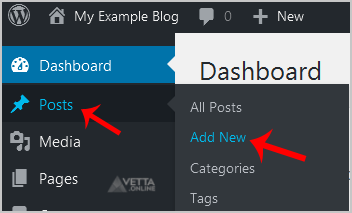
Under the dashboard menu, hover your mouse on
Posts
and then click on
Add New
.
3.
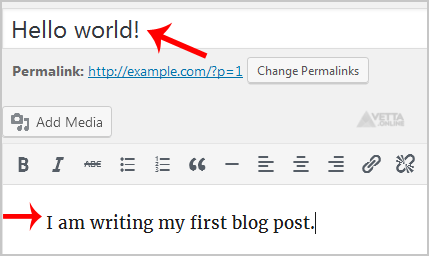
Enter Title in the Title box and write your blog post.
4.
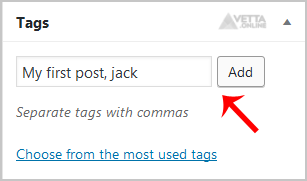
Scroll down to the
Tags
option and enter tags. If you wish to enter multiple tags, use a comma, and click on the
Add
button.
5.
Select the appropriate category or click on
Add New Category
.
6.
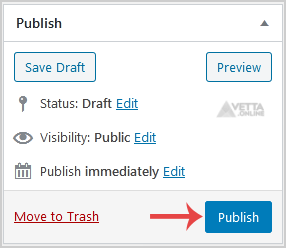
Now scroll up and find
Publish
. Then click it.
Share via
Did you find this article useful?
Related Articles
How to remove sample comments, posts on a new WordPress blog?
How to Manually Install/Reinstall an OS, Using SolusVM for Customized Installation?
How to Start/Boot Your VPS Using SolusVM?
Categories
4
Backup/Restore
24
cPanel - Control Panel
11
Databases
6
DNS - Nameservers
10
Domain Management
11
Email
6
— Mozilla Thunderbird
9
FTP
5
— FileZilla Client
6
Installing a Control Panel
8
Mail Filters & SPAM
11
Mobile
7
— Android
4
— iOS/Apple
3
Others
10
Security
61
SiteWorx (Control Panel)
2
— Backup/Restore
4
— Domain Management
6
— Email (SiteWorx)
3
— FTP
3
— Others (SiteWorx)
4
— Security (SiteWorx)
8
— SiteWorx Basic
31
— Softaculous (SiteWorx)
14
—— Blog
2
—— CMS/Portal
13
—— Forum
76
Softaculous
16
— Blog
43
— CMS/Portal
15
— Forum
19
SolusVM
6
— SolusVM Basic
13
— SolusVM VPS Management
5
SSL (cPanel)
17
WordPress
38
DirectAdmin
4
— Backup/Restore
8
— Databases (DA)
8
— Domain Management (DA)
6
— Email (DA)
4
— FTP
7
— Mail Filters & SPAM
18
WHM
12
— WHM (For Resellers)
5
— WHM (Root)
© Vetta Group