Back to website
Login
Home
Login
Register
Back to website
There was a problem loading the comments.
How to Remove Domain Redirect in cPanel?
Support Portal
»
Knowledgebase
» Viewing Article
Print
20/06/2019 1:48 AM
Domain Management
1.
Log into your cPanel account.
2.
In the
Domains
section, click on
Redirects
Icon.
3.
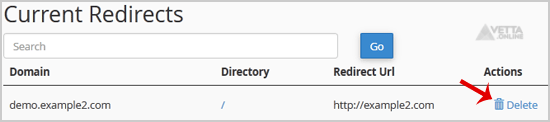
Scroll down to the end of the page and under
Current Redirects
locate the domain and click on the
remove
icon.
4.
For confirmation, click on the
Remove Redirect
button once more.
Share via
Did you find this article useful?
Related Articles
How to remove domain pointer in DirectAdmin?
How to remove sub-domain in DirectAdmin?
How to Remove Parked Domain name in cPanel?
Categories
4
Backup/Restore
6
DNS - Nameservers
11
Databases
38
DirectAdmin
4
— Backup/Restore
8
— Databases (DA)
8
— Domain Management (DA)
6
— Email (DA)
4
— FTP
7
— Mail Filters & SPAM
10
Domain Management
11
Email
6
— Mozilla Thunderbird
9
FTP
5
— FileZilla Client
6
Installing a Control Panel
8
Mail Filters & SPAM
11
Mobile
7
— Android
4
— iOS/Apple
3
Others
5
SSL (cPanel)
10
Security
61
SiteWorx (Control Panel)
2
— Backup/Restore
4
— Domain Management
6
— Email (SiteWorx)
3
— FTP
3
— Others (SiteWorx)
4
— Security (SiteWorx)
8
— SiteWorx Basic
31
— Softaculous (SiteWorx)
14
—— Blog
2
—— CMS/Portal
13
—— Forum
76
Softaculous
16
— Blog
43
— CMS/Portal
15
— Forum
19
SolusVM
6
— SolusVM Basic
13
— SolusVM VPS Management
18
WHM
12
— WHM (For Resellers)
5
— WHM (Root)
17
WordPress
24
cPanel - Control Panel
© Vetta Group